|
搭建ssh服务器
1.安装ssh服务器:sudo apt-get install openssh-server
2.查看ssh配置文件:vim /etc/ssh/sshd_config
# Package generated configuration file
# See the sshd_config(5) manpage for details

# What ports, IPs and protocols we listen for
Port 22
# Use these options to restrict which interfaces/protocols sshd will bind to
#ListenAddress ::
#ListenAddress 0.0.0.0
Protocol 2
# HostKeys for protocol version 2
HostKey /etc/ssh/ssh_host_rsa_key
HostKey /etc/ssh/ssh_host_dsa_key
HostKey /etc/ssh/ssh_host_ecdsa_key
HostKey /etc/ssh/ssh_host_ed25519_key
#Privilege Separation is turned on for security
UsePrivilegeSeparation yes

# Lifetime and size of ephemeral version 1 server key
KeyRegenerationInterval 3600
ServerKeyBits 1024

# Logging
SyslogFacility AUTH
88 lines yanked
# Authentication:
LoginGraceTime 120
PermitRootLogin prohibit-password
StrictModes yes
RSAAuthentication yes
PubkeyAuthentication yes
#AuthorizedKeysFile %h/.ssh/authorized_keys
# Don't read the user's ~/.rhosts and ~/.shosts files
IgnoreRhosts yes
# For this to work you will also need host keys in /etc/ssh_known_hosts
RhostsRSAAuthentication no
# similar for protocol version 2
HostbasedAuthentication no
# Uncomment if you don't trust ~/.ssh/known_hosts for RhostsRSAAuthentication
#IgnoreUserKnownHosts yes
# To enable empty passwords, change to yes (NOT RECOMMENDED)
PermitEmptyPasswords no
1,1 Top
说明:
Port 22 //默认使用22端口,也可以自行修改为其他端口,但登录时要打上端口号
#ListenAddress //指定提供ssh服务的IP,这里我注释掉。
PermitRootLogin //禁止以root远程登录
PasswordAuthentication yes //启用口令验证方式
PermitEmptyPassword //禁止使用空密码登录
LoginGraceTime 1m //重复验证时间为1分钟
MaxAuthTimes 3 //最大重试验证次数
保存修改好的配置,退出。
3.我们先不修改,先择启动服务器
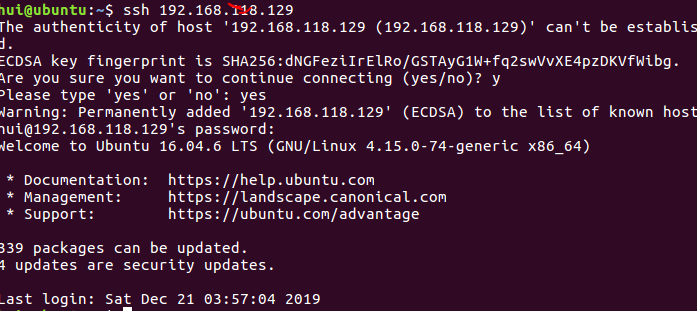
4.使用SSH客户端登录
(1)Linux客户机
# ssh 192.168.1.100 //输入服务器IP登录,不加用户名默认以root身份登录
或者
# ssh hui@192.168.1.100 //以hui身份登入服务器
(2).windows下使用远程登录客户端登录
时下最流行的是putty这款登录软件,无需安装,下载下来就可以使用,简单、方便、安全!
·当服务器使用口令验证方式时,只需输入用户名和密码即可
需要程序源码的可以加我微信x241602私聊。
来源:https://www.cnblogs.com/huipengbo/p/12193288.html |



 发表于 2020-1-14 17:41:00