- UID
- 677950
- 积分
- 0
- 金币
- 0
- 精华
- 0
- 威望
- 0
- 贡献
- 0
- 阅读权限
- 220
- 注册时间
- 2009-10-8
- 最后登录
- 2026-5-6
- 在线时间
- 0 小时
热心网友
- 金币
- 0
- 阅读权限
- 220
- 精华
- 0
- 威望
- 0
- 贡献
- 0
- 在线时间
- 0 小时
- 注册时间
- 2009-10-8
|
第一步
注册:
注册没什么好说的了,点击注册,按要求注册,实在不行看这个220.博客园申请教程及基本操作 - Zander_Zhao - 博客园
第二步
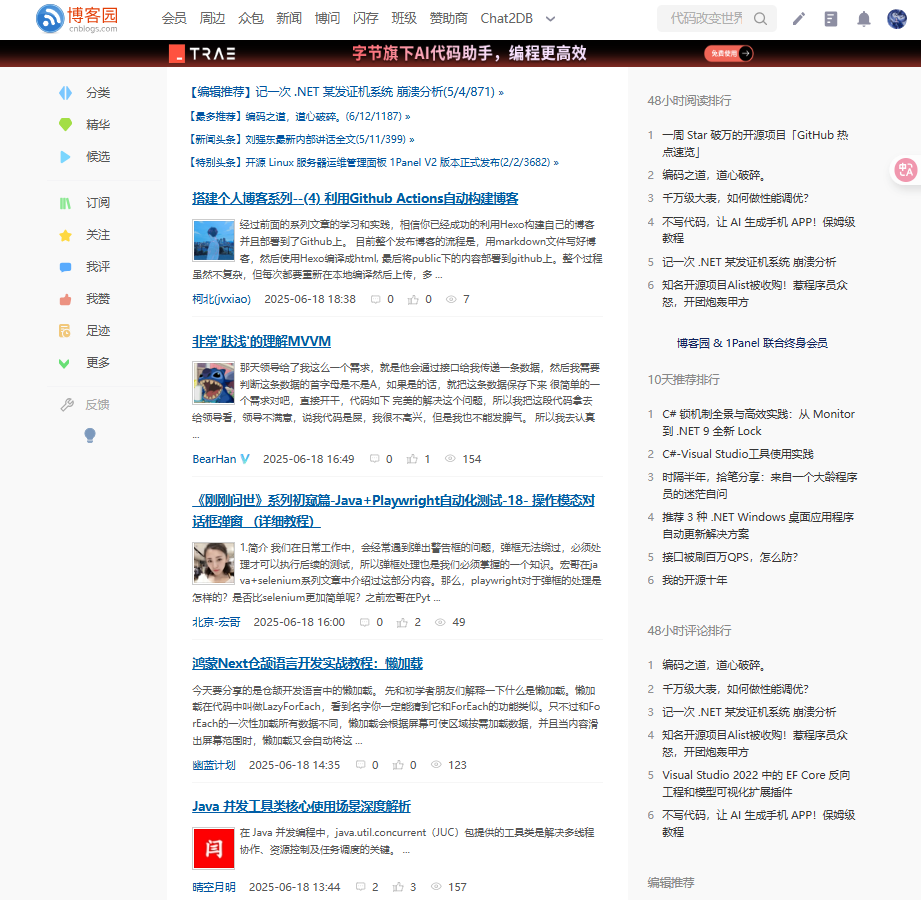
进入博客园
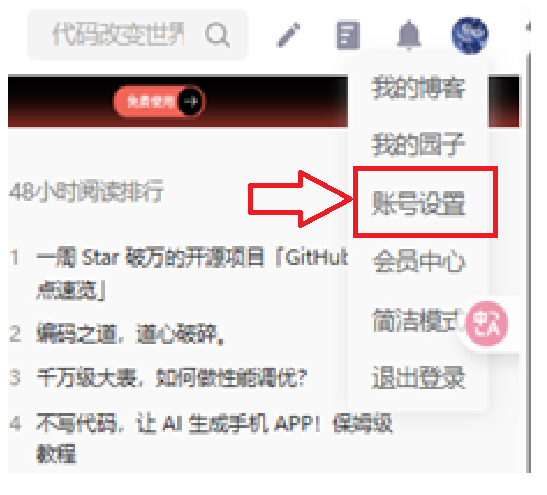
点击右上角的账号设置
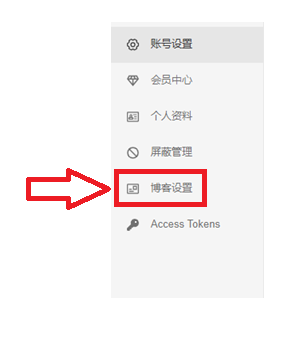
点击博客设置
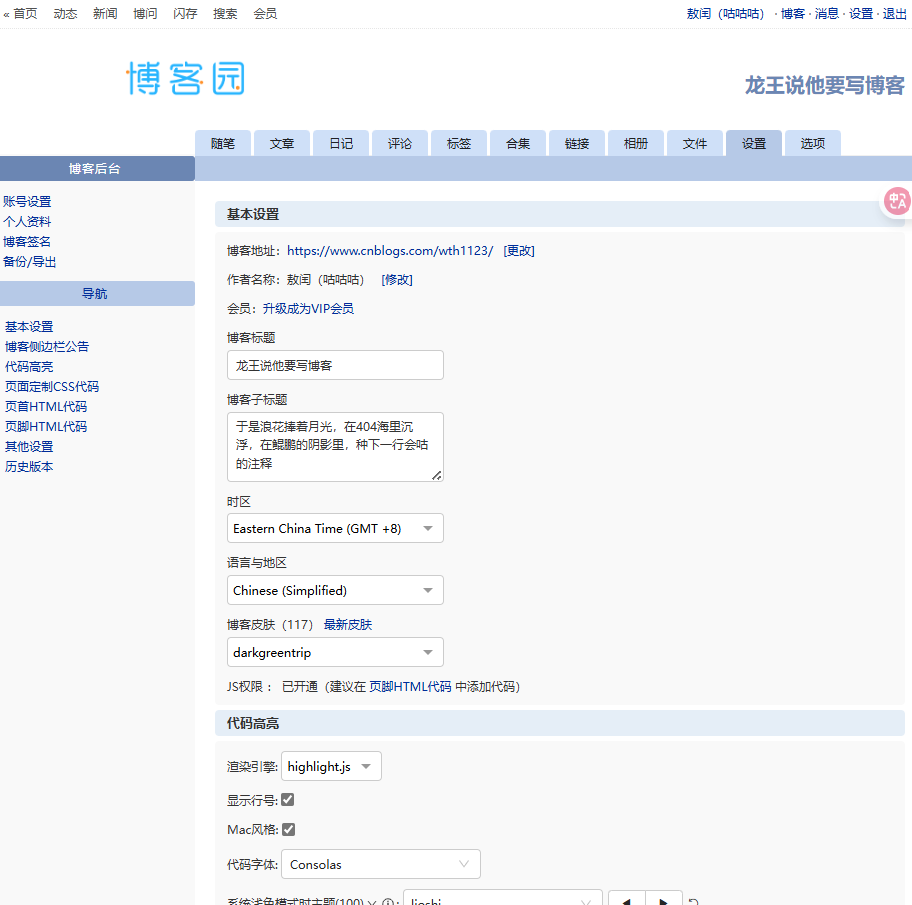
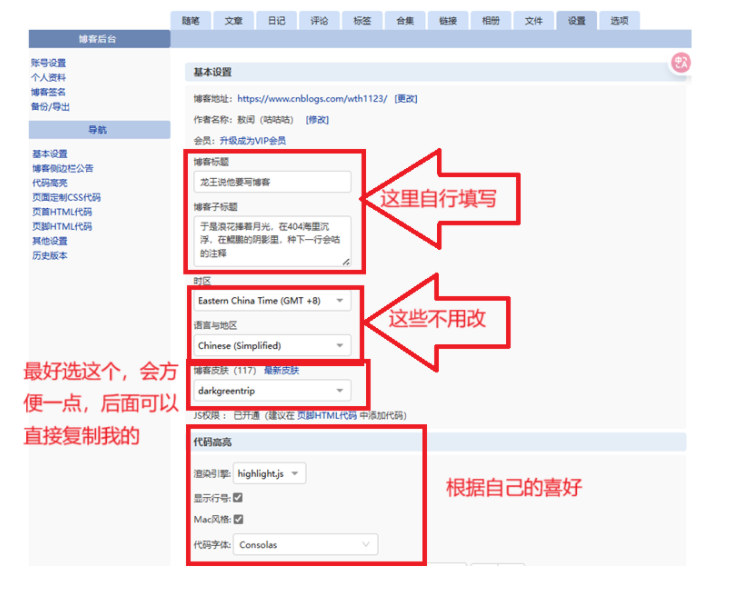
进入之后是这样的:
设置
博客侧边栏公告加入看娘版:
<!-- live2D -->
<script src="https://l2dwidget.js.org//lib/L2Dwidget.min.js"></script>
<script type="text/javascript">
L2Dwidget
.on('*', (name) => {console.log('%c EVENT ' + '%c -> ' + name, 'background: #222; color: yellow', 'background: #fff; color: #000')})
.init({
    dialog: {
        enable: true,
        script: {
            'every idle 5s': '$hitokoto$',
            'hover .star': '星星在天上而你在我心里 (*/ω\*)',
            'tap body': '哎呀!别碰我!',
            'tap face': '人家已经不是小孩子了!'
        }
    },
    "model": {
        <!-- jsonpath控制显示看板娘模型 -->
        jsonPath: "https://unpkg.com/live2d-widget-model-z16@1.0.5/assets/z16.model.json",
        "scale": 1
    },
    "display": {
        "position": "right", //看板娘的表现位置
        "width": 170, //看板娘的宽度
        "height": 300, //看板娘的高度
        "hOffset": 0,
        "vOffset": -20
    },
    "mobile": {
        "show": true,
        "scale": 0.5
    },
    "react": {
        "opacityDefault": 0.7,
        "opacityOnHover": 0.2
    }
});
</script>
页面定制css代码直接加入这个:
#home {
    margin: 0 auto;
    width: 80%;/*原始65*/
    min-width: 980px;/*页面顶部的宽度*/
    background-color: rgba(245, 245, 245, 0.7);
    padding: 30px;
    margin-top: 50px;
    margin-bottom: 50px;
    box-shadow: 0 2px 6px rgba(100, 100, 100, 0.3);
border-radius: 12px;  /*调节边框圆度*/
}
/*boby调节背景图片*/
body {
    background:url("https://images.cnblogs.com/cnblogs_com/nthforsth/1636966/o_2001210816401565149939605.png");  /*背景图片链接*/
    background-position:center left;
    background-size: cover;
    background-repeat: no-repeat;
    background-attachment:fixed;
}
#blogTitle {
    height: 100px;  /*高度/
border-radius: 12px;
    clear: both;
    background-color: #cccccc69;   /*博客标题的背景*/

}
#blogTitle h1 {
    font-size: 36px;
color:#808080;
    font-weight: bold;

    line-height: 1.8em;/*原始 1.6em*/
    margin-top: 10px;/*原始 15px */

}
#blogTitle h2 {
    font-weight: normal;
    font-size: 17px; /*原始 16px ;font-size: 1.0rem;*/
    line-height: 1.8;
    color: #320f9d;
    font-weight: bold;
    text-align: right;
    float: right;
}
#navigator{
border-radius: 7px;
    background-color:rgba(135,206,205, 0.5);          /*标题栏下的颜色*/

}
#navList a:link, #navList a:visited, #navList a:active{
    color: #FFFFFF;
    font-size: 18px;
    font-weight: bold;
}
.blogStats{
    color: #eee;
}
.postTitle {
    border-left: 8px solid rgba(132,112,255, 0);
    margin-left: 10px;
    margin-bottom: 10px;
    font-size: 20px;
    float: right;
    width: 100%;
    clear: both;
}
.postTitle a:link, .postTitle a:visited, .postTitle a:active {
    color:     #FF6A6A;
    transition: all 0.4s linear 0s;
}
.postTitle a:hover {
    margin-left: 30px;
    color: #EE6363;
    text-decoration: none;
}
.postCon {
    float: right;
    line-height: 1.5em;
    width: 100%;
    clear: both;
    padding: 10px 0;
}
.day .postTitle a {
    padding-left: 10px;
}
.day {
    background: rgba(255, 255, 255, 0.5);
}
/*文章附加信息*/
.postDesc {
    background: url(images/posted_time.png) no-repeat 0 1px;
    color: #757575;
    float: left;
    width: 100%;
    clear: both;
    text-align: left;
    font-family: "微软雅黑" , "宋体" , "黑体" ,Arial;
    font-size: 13px;
    padding-right: 20px;/*5px  padding-left: 90px;posted 发表时间左边距离*/
    margin-top: 20px;
    line-height: 1.8;
    padding-bottom: 35px;
}
.newsItem, .catListEssay, .catListLink, .catListNoteBook, .catListTag, .catListPostCategory,
.catListPostArchive, .catListImageCategory, .catListArticleArchive, .catListView,
.catListFeedback, .mySearch, .catListComment, .catListBlogRank, .catList, .catListArticleCategory ,#blog-calendar
{
    background: rgba(255, 255, 255, 0.5);
    margin-bottom: 35px;
    word-wrap: break-word;
}
.CalTitle{
    background: rgba(255, 255, 255, 0);
}
.catListTitle{
    background-color: rgba(255,110,180,0.6);   //栏目的条纹颜色
}
#topics{
    background: rgba(255, 255, 255, 0.5);
}
.c_ad_block{
    display: none;
}
#tbCommentBody{
    width: 100%;
    height: 200px;
    background: rgba(255, 255, 255, 0.5);
}
#q{background: rgba(255, 255, 255, 0);}

.CalNextPrev{background: rgba(255, 255, 255, 0);}

.cnblogs_code{
    background: rgba(255, 255, 255, 0);
}
.cnblogs_code div{
    background: rgba(255, 255, 255, 0);
}
.cnblogs_code_toolbar{
    background: rgba(255, 255, 255, 0);
}
#main{min-width: 640px;}
.entrylist{
    background: rgba(255, 255, 255, 0.5);
}


cursor: url(https://files.cnblogs.com/files/wkfvawl/cursor.ico),auto;


#div_digg{
  padding: 5px;
  border-radius: 5px;
  position: fixed;
  left: 0;
  bottom: 80px;
  width:80px;
  z-index:100;
}
.diggit{
  background: url(http://images2017.cnblogs.com/blog/894443/201709/894443-20170920105433618-867225449.png) no-repeat;
  width: 60px;
  height: 60px;
}
#div_digg .diggnum{
  position: absolute;
  bottom: -20px;
  left: 6px;
  background: #D0D0D0;
  padding: 2px 0;
  display: block;
  color: #555;
  font-size: 12px;
  text-align: center;
  width: 60px;
  -moz-border-radius: 4px;
  -webkit-border-radius: 4px;
  font-weight: bold;
}
/* 删除反对按钮,有点邪恶了 */
.buryit{
  display: none;
}


/* 定制返回顶部按键 */
#back-to-top {
    background-color: #87cefe;
    bottom: 0;
    box-shadow: 0 0 6px #bdc3c7;
    color: #444444;
    padding: 10px 10px;
    position: fixed;
    right: 50px;
    cursor: pointer;
    border-radius: 30px;
}


<!-- 粒子吸附,线条汇集动画 -->
<canvas id="c_n9" width="1920" height="990" style="position:fixed; top:0px; left:0px; z-index:-1; opacity:0.5;"></canvas>
<script src="https://files.cnblogs.com/files/siwuxie095/canvas-nest.min.js"></script>

<!-- 鼠标点击烟花特效 -->
<canvas width="1600" height="900" style="position:fixed; left:0px; top:0px; z-index: 99999; pointer-events: none;"></canvas>
<script src="https://blog-static.cnblogs.com/files/yjlblog/cursor-effects.js"></script>

<!-- jquery不用引入,博客园本身已经引入了 -->

<!-- 点击爱心/星星特效 -->
<script type="text/javascript">
    //在标题后面添加两个按钮,大美女还是大帅锅
    $("#blogTitle div:first").append(`<button class="addButton" onclick="gender=2">美女</button> <button class="addButton" onclick="gender=1">帅锅</button>`);
   //对应的CSS在上面
    var gender = 1;//男士1,女士2 ,默认男士
    var a_idx = 0;
    // 内容可以自定义
    // 社会主义核心价值观:富强、民主、文明、和谐、自由、平等、公正、法治、爱国、敬业、诚信、友善
    // var a = new Array("❤富强","❤民主","❤文明","❤和谐","❤自由","❤平等","❤公正","❤法治","❤爱国","❤敬业","❤诚信","❤友善");
    var a1 = new Array("☆英俊潇洒","☆玉树临风","☆翩翩少年","☆一表人才", "☆义薄云天","☆铁骨铮铮","☆仪表堂堂","☆温文尔雅","☆气宇轩昂","☆风度翩翩","☆风流才子","☆才貌双绝");
    var a2 = new Array("❤窈窕淑女","❤举止娴雅","❤明眸皓齿","❤柳叶弯眉","❤冰肌玉骨","❤肤若凝脂","❤冰清玉洁","❤蕙心兰质","❤天生尤物","❤娇艳如花","❤嫣然一笑","❤千娇百媚","❤静如处女","❤动若脱兔","❤风姿绰约","❤妖娆动人");
    jQuery(document).ready(function($) {
        $("body").click(function(e) {
            //男女不同
            if(gender === 1){
                a = a1;
            }  else if(gender === 2){
                a = a2;
            }
            var $i = $("<span></span>").text(a[a_idx]);
            a_idx = (a_idx + 1) % a.length;
            var x = e.pageX,
            y = e.pageY;
            $i.css({
                "z-index": 9999,
                "top": y - 20,
                "left": x,
                "position": "absolute",
                "font-weight": "bold",
                "font-size": "15px",
                "color": "rgb("+~~(255*Math.random())+","+~~(255*Math.random())+","+~~(255*Math.random())+")"
            });
            $("body").append($i);
            $i.animate({
                "top": y - 180,
                "opacity": 0
            },
            1000,
            function() {
                $i.remove();
            });
        });
    });
</script>

/*重置属性*/
*{margin: 0;                                                            /*外边距属性*/
padding: 0;                                                                /*内边距属性*/
-moz-box-sizing: border-box;                                            /* 火狐浏览器 */
-webkit-box-sizing: border-box;                                            /* webkit内核浏览器 */
box-sizing: border-box;                                                 /*内边距和边框是在元素设置的宽度和高度之内进行绘制的*/
}
body{font-size: 16px;font-family: "微软雅黑";color: #222222;}              /*字体,大小,颜色*/
body{
    -moz-user-select:none;/*火狐*/
    -webkit-user-select:none;/*webkit浏览器*/
    -ms-user-select:none;/*IE10*/
    -khtml-user-select:none;/*早期浏览器*/
      user-select:none;
}                                                                    /*禁止选中字体*/
b{font-weight: normal;}                                                  /*粗体重置,便于当作普通标签用CSS美化*/
i{font-style: normal;}                                                   /*斜体重置,便于当作普通标签用CSS美化*/
a,a:hover,a:active{text-decoration: none;color:#222222;}                  /*鼠标点击状态重置*/
input,textarea,select{outline: none;}                                      /*去掉点击文本框时,轮廓被选中的状态*/
img{border: none;vertical-align: top;}                                  /*图片边框重置,垂直对齐方式顶部对齐*/
li{list-style: none;}                                                     /*列表标志重置*/
.fl{float: left;}                                                         /*左浮动*/
.fr{float: right;}                                                         /*右浮动*/
.cl{clear: both;}                                                         /*清除两侧浮动*/
.clearfix::after{                                                        /*伪类方法,防止高度塌陷*/
    content: "";                                                            /*添加空内容*/
    display: table;                                                            /*转成表格元素*/
    clear: both;                                                            /*清除两侧浮动*/
}
/*代码折叠美化*/
summary {
    background-color: antiquewhite;                        /*背景色*/
    padding: 15px;                                        /*外边框*/
    border-radius: 15px;                                /*圆角*/
}
/*去除广告美化*/
#cnblogs_ch, #cnblogs_c1, #under_post_card1, #under_post_card2, #HistoryToday  {
    display: none;
}
/*添加的两个按钮样式*/
.addButton { /* 按钮美化 */
    float:right;
    width: 45%; /* 宽度 */
    height: 40px; /* 高度 */
    border-width: 0px; /* 边框宽度 */
    border-radius: 3px; /* 边框半径 */
    background: #F9F9F9; /* 背景颜色 */
    cursor: pointer; /* 鼠标移入按钮范围时出现手势 */
    outline: none; /* 不显示轮廓线 */
    color: black; /* 字体颜色 */
    font-size: 18px; /* 字体大小 */
}
.addButton:hover { /* 鼠标移入按钮范围时改变颜色 */
    background: #F0F0F0;
}
首页HTML代码加入:
<script>

!function(){

function n(n,e,t){

return n.getAttribute(e)||t

}

function e(n){

return document.getElementsByTagName(n)

}

function t(){

var t=e("script"),o=t.length,i=t[o-1];

return{

l:o,z:n(i,"zIndex",-1),o:n(i,"opacity",.5),c:n(i,"color","0,0,0"),n:n(i,"count",99)

}

}

function o(){

a=m.width=window.innerWidth||document.documentElement.clientWidth||document.body.clientWidth,

c=m.height=window.innerHeight||document.documentElement.clientHeight||document.body.clientHeight

}

function i(){

r.clearRect(0,0,a,c);

var n,e,t,o,m,l;

s.forEach(function(i,x){

for(i.x+=i.xa,i.y+=i.ya,i.xa*=i.x>a||i.x<0?-1:1,i.ya*=i.y>c||i.y<0?-1:1,r.fillRect(i.x-.5,i.y-.5,1,1),e=x+1;e<u.length;e++)n=u[e],

null!==n.x&&null!==n.y&&(o=i.x-n.x,m=i.y-n.y,

l=o*o+m*m,l<n.max&&(n===y&&l>=n.max/2&&(i.x-=.03*o,i.y-=.03*m),

t=(n.max-l)/n.max,r.beginPath(),r.lineWidth=t/2,r.strokeStyle="rgba("+d.c+","+(t+.2)+")",r.moveTo(i.x,i.y),r.lineTo(n.x,n.y),r.stroke()))

}),

x(i)

}

var a,c,u,m=document.createElement("canvas"),

d=t(),l="c_n"+d.l,r=m.getContext("2d"),

x=window.requestAnimationFrame||window.webkitRequestAnimationFrame||window.mozRequestAnimationFrame||window.oRequestAnimationFrame||window.msRequestAnimationFrame||

function(n){

window.setTimeout(n,1e3/45)

},

w=Math.random,y={x:null,y:null,max:2e4};m.id=l,m.style.cssText="position:fixed;top:0;left:0;z-index:"+d.z+";opacity:"+d.o,e("body")[0].appendChild(m),o(),window.οnresize=o,

window.onmousemove=function(n){

n=n||window.event,y.x=n.clientX,y.y=n.clientY

},

window.onmouseout=function(){

y.x=null,y.y=null

};

for(var s=[],f=0;d.n>f;f++){

var h=w()*a,g=w()*c,v=2*w()-1,p=2*w()-1;s.push({x:h,y:g,xa:v,ya:p,max:6e3})

}

u=s.concat([y]),

setTimeout(function(){i()},100)

}();

</script>


<link  type="text/css" rel="stylesheet" href="https://files.cnblogs.com/files/hafiz/feedback.css">
页脚HTML加入:
<!-- 粒子吸附,线条汇集动画 -->
<canvas id="c_n9" width="1920" height="990" style="position:fixed; top:0px; left:0px; z-index:-1; opacity:0.5;"></canvas>
<script src="https://files.cnblogs.com/files/siwuxie095/canvas-nest.min.js"></script>

<!-- 鼠标点击烟花特效 -->
<canvas width="1600" height="900" style="position:fixed; left:0px; top:0px; z-index: 99999; pointer-events: none;"></canvas>
<script src="https://blog-static.cnblogs.com/files/yjlblog/cursor-effects.js"></script>

<!-- jquery不用引入,博客园本身已经引入了 -->

<!-- 点击爱心/星星特效 -->
<script type="text/javascript">
    //在标题后面添加两个按钮,大美女还是大帅锅
    $("#blogTitle div:first").append(`<button class="addButton" onclick="gender=2">美女</button> <button class="addButton" onclick="gender=1">帅锅</button>`);
   //对应的CSS在上面
    var gender = 1;//男士1,女士2 ,默认男士
    var a_idx = 0;
    // 内容可以自定义
    // 社会主义核心价值观:富强、民主、文明、和谐、自由、平等、公正、法治、爱国、敬业、诚信、友善
    // var a = new Array("❤富强","❤民主","❤文明","❤和谐","❤自由","❤平等","❤公正","❤法治","❤爱国","❤敬业","❤诚信","❤友善");
    var a1 = new Array("☆英俊潇洒","☆玉树临风","☆翩翩少年","☆一表人才", "☆义薄云天","☆铁骨铮铮","☆仪表堂堂","☆温文尔雅","☆气宇轩昂","☆风度翩翩","☆风流才子","☆才貌双绝");
    var a2 = new Array("❤窈窕淑女","❤举止娴雅","❤明眸皓齿","❤柳叶弯眉","❤冰肌玉骨","❤肤若凝脂","❤冰清玉洁","❤蕙心兰质","❤天生尤物","❤娇艳如花","❤嫣然一笑","❤千娇百媚","❤静如处女","❤动若脱兔","❤风姿绰约","❤妖娆动人");
    jQuery(document).ready(function($) {
        $("body").click(function(e) {
            //男女不同
            if(gender === 1){
                a = a1;
            }  else if(gender === 2){
                a = a2;
            }
            var $i = $("<span></span>").text(a[a_idx]);
            a_idx = (a_idx + 1) % a.length;
            var x = e.pageX,
            y = e.pageY;
            $i.css({
                "z-index": 9999,
                "top": y - 20,
                "left": x,
                "position": "absolute",
                "font-weight": "bold",
                "font-size": "15px",
                "color": "rgb("+~~(255*Math.random())+","+~~(255*Math.random())+","+~~(255*Math.random())+")"
            });
            $("body").append($i);
            $i.animate({
                "top": y - 180,
                "opacity": 0
            },
            1000,
            function() {
                $i.remove();
            });
        });
    });
</script>


<script type="text/javascript">
   window.onload = function () {
                var minSize = 10; //最小字体
                var maxSize = 20;//最大字体
                var newOne = 600; //生成雪花间隔
                var flakColor = "#f5f5f5fa"; //雪花颜色
                var flak = $("<div></div>").css({position:"absolute","top":"0px"}).html("✽");//定义一个雪花
                var dhight = $(window).height(); //定义视图高度
                var dw =$(window).width()-80; //定义视图宽度
                setInterval(function(){
                var sizeflak = minSize+Math.random()*maxSize; //产生大小不等的雪花
                var startLeft = Math.random()*dw; //雪花生成是随机的left值
                var startOpacity = 0.7+Math.random()*0.3; //随机透明度
                var endTop= dhight-100; //雪花停止top的位置
                var endLeft= Math.random()*dw; //雪花停止的left位置
                var durationfull = 5000+Math.random()*3000; //雪花飘落速度不同
                flak.clone().appendTo($("body")).css({
                "left":startLeft ,
                "opacity":startOpacity,
                "font-size":sizeflak,
                "color":flakColor
                }).animate({
                "top":endTop,
                "left":endLeft,
                "apacity":0.1
                },durationfull,function(){
                $(this).remove()
                });
                },newOne);
            }
 </script>
<script language="javascript" type="text/javascript">
//生成目录索引列表
function GenerateContentList()
{
    var jquery_h3_list = $('#cnblogs_post_body h3');//如果你的章节标题不是h3,只需要将这里的h3换掉即可
    if(jquery_h3_list.length>0)
    {
        var content = '<a name="_labelTop"></a>';
        content    += '<div id="navCategory">';
        content    += '<p style="font-size:18px"><b>阅读目录</b></p>';
        content    += '<ul>';
        for(var i =0;i<jquery_h3_list.length;i++)
        {
            var go_to_top = '<div style="text-align: right"><a href="#_labelTop">回到顶部</a><a name="_label' + i + '"></a></div>';
            $(jquery_h3_list).before(go_to_top);
            var li_content = '<li><a href="#_label' + i + '">' + $(jquery_h3_list).text() + '</a></li>';
            content += li_content;
        }
        content    += '</ul>';
        content    += '</div>';
        if($('#cnblogs_post_body').length != 0 )
        {
            $($('#cnblogs_post_body')[0]).prepend(content);
        }
    }
}
GenerateContentList();
</script>


<script type="text/javascript">
$(function(){
    $('#blogTitle h1').addClass('bounceInLeft animated');
    $('#blogTitle h2').addClass('bounceInRight animated');
    // 删除反对按钮
    $('.buryit').remove();
    initCommentData();
});
function initCommentData() {
    $('.feedbackItem').each(function() {
        var text = $(this).find('.feedbackListSubtitle .layer').text();
        // 将楼层信息放到data里面
        // $(this).find('.blog_comment_body').attr('data-louceng', text.replace(/^#/g, ''));
        if($(this).find('.feedbackListSubtitle .louzhu').length>0) $(this).addClass('myself');
        var avatar = $(this).find('> .feedbackCon > span').html() || 'http://pic.cnitblog.com/face/sample_face.gif';
        $(this).find('> .feedbackCon > .blog_comment_body').append('<img class="user-avatar" src="'+avatar+'"/>')
    });
}

$(document).ajaxComplete(function(event, xhr, settings) {
  // 监听获取评论ajax事件
  if(settings.url.indexOf('/mvc/blog/GetComments.aspx') >= 0) {
    initCommentData();
  }
});
</script>


<span id="back-to-top"><a href="#top">想要回到顶端吗??</a></span>
就成功啦
本文来自博客园,作者:解小花,转载请注明原文链接:https://www.cnblogs.com/wth1123/p/18935214
来源:https://www.cnblogs.com/wth1123/p/18935214 |
|



 发表于 2025-6-19 17:10:00