|
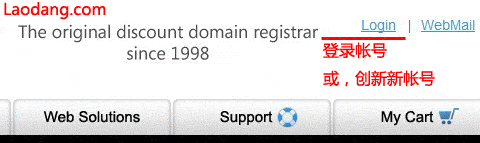
1、进入Mydomain.com 官方网站 www.mydomain.com (mydomains.com也是这家的域名。),点击右上角的 “Login”链接。
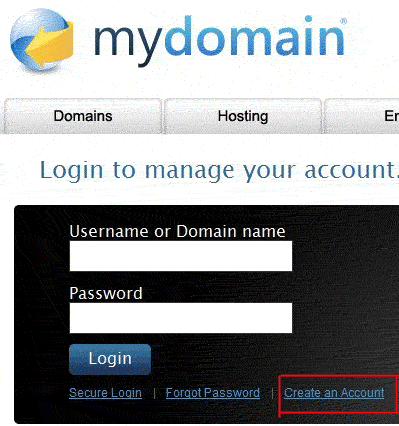
2、点击“Create an Account”链接,进入创建账户页面。
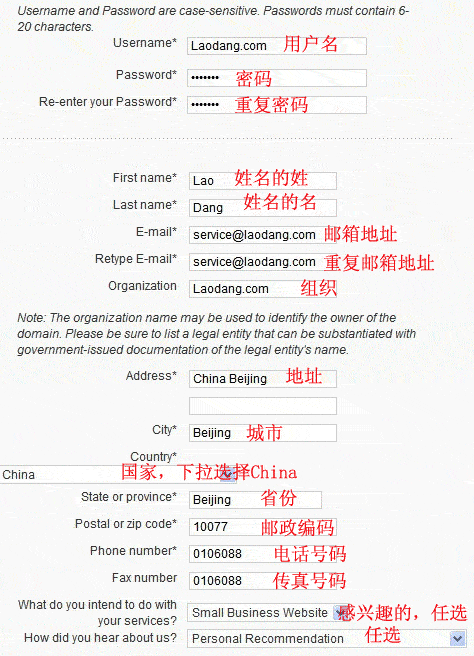
3、填写如下信息
New Users
Username* 用户名
Password* 密码
Re-enter your Password* 重复密码
First name* 姓
Last name* 名
E-mail* 邮箱
Retype E-mail* 重复邮箱
Organization 组织
Address* 地址
City* 城市
Country* 国家,下拉选择China
State or province* 省或者州
Postal or zip code* 邮编
Phone number* 电话号码
Fax number 传真号码
What do you intend to do with your services? 随意选择一个
How did you hear about us? 随意选择一个
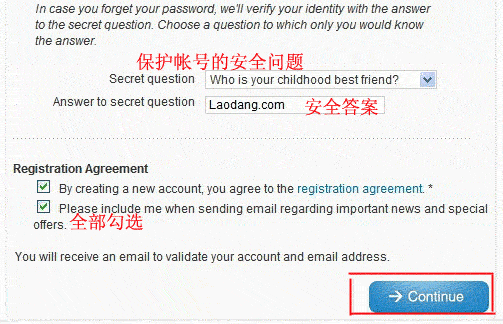
Choose a Security Question 选择一个安全问题
In case you forget your password, we'll verify your identity with the answer to the secret question. Choose a question to which only you would know the answer.
Secret question
Answer to secret question 安全问题的答案
Registration Agreement
By creating a new account, you agree to the registration agreement. * 同意该条款
Please include me when sending email regarding important news and special offers.
5、点击“Continue”,完成Mydomain.com 的新用户的注册。 |



 发表于 2014-8-26 16:51:49